Snowlinux 4 XFCE & E17 released!
- Details
- Category: Blog
- Published on Monday, 21 January 2013 08:01
- Written by Lars
- Hits: 9013
The team is proud to announce the release of Snowlinux 4 XFCE & E17.
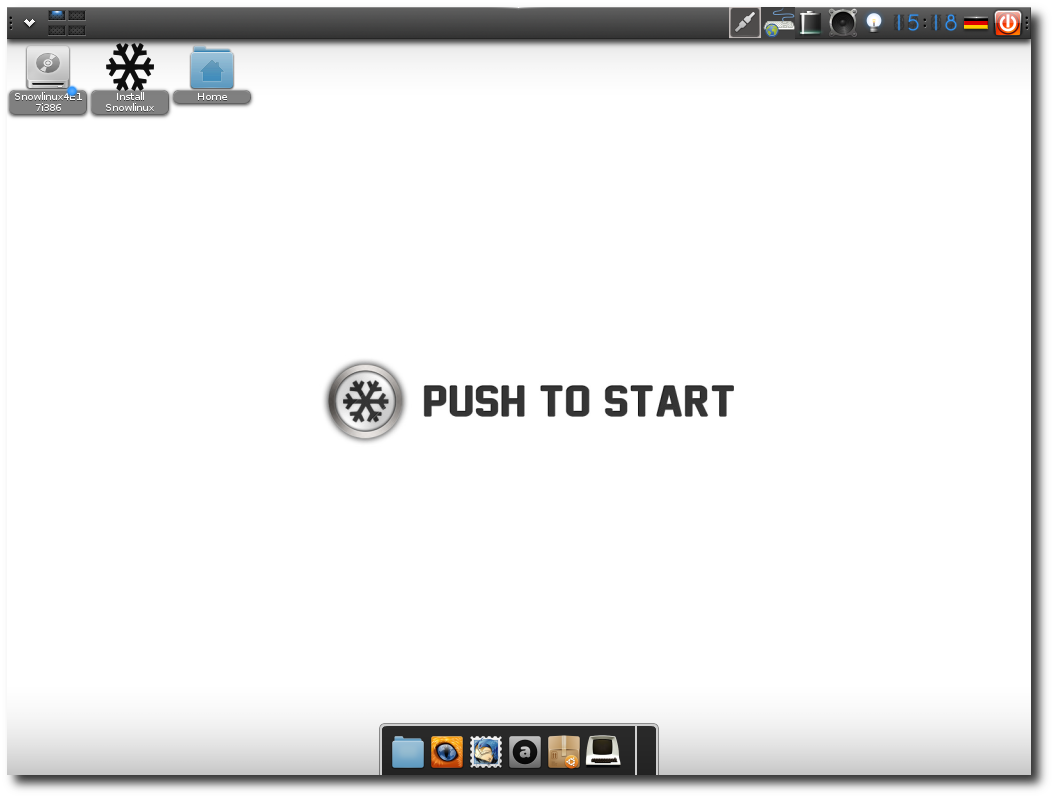
Snowlinux 4 XFCE Snowlinux 4 E17
Snowlinux 4 XFCE is based upon Debian GNU/Linux 7.0 "Wheezy" and uses Linux 3.5. Snowlinux 4 XFCE & E17 is available in two ISOs. Two ISO images are available. The XFCE edition contains XFCE 4.10 and the E17 edition contains E17. While the XFCE edition fits on CD, the E17 edition doesn't. Both are using Firefox, Thunderbird, Abiword, Shotwell and Pidgin by default.
New features:
- Debian GNU/Linux Wheezy 7.0
- Linux 3.5
- XFCE 4.10
- E17
- LightDM
- Snowlinux LightDM greeter
- Snowlinux Plymouth theme
- Improved Snowlinux-Metal-Theme
- Improved Snowlinux-Metal-Icons
- SnowMount
- Firefox 17
- Thunderbird 17
- Snowlinux HD backgrounds
- Updated software
- Improved speed and response
- System improvements
For a complete overview of the new features, visit: “What's new in Snowlinux 4 XFCE" / “What's new in Snowlinux 4 E17"
Make sure to read the “Release Notes (XFCE) / Release Notes (E17)” to be aware of important info or known issues related to this release.
Upstream information:
Snowlinux 4 XFCE & E17 is based upon Debian GNU/Linux 7.0 "Wheezy" Stable. It comes along with the Linux kernel 3.5 and XFCE & E17. It has installed Firefox 17, Thunderbird 17, Abiword, Shotwell and Pidgin by default.
Life cycle:
Snowlinux 4 "Glacier" is supported until February 2016.
Compatibility with Debian:
Snowlinux 4 "Glacier" is 100 % compatible with Debian's Repository.
System requirements:
- x86-CPU
- 256 MB memory
- 2 GB free disk space
- Graphics card capable of 800×600 resolution
- CD-ROM drive or USB port
Md5sum:
XFCE
32-bit: 475dcb2b9a7a1f523287db5e29397cbb
64-bit: e3e89d998d66b73d6b98bb58fb3f7bef
E17
32-bit: d660791ec164c9a411b7c62749ee26ca
64-bit: 72b63ffdd10cb01eb81a2594b0bd6450
Download:
XFCE
E17
We are looking forward to your comment on this release. Thank you for using Snowlinux and enjoy this new release.


The USB does autologin but the CD version does not.
Please don't repeat the User/Password, we know, it just is not working for some of us.
As others have said this looks great but I need the same interface on 3 machine (1 laptop, 1 EEEPC 701SD (USB works) , 1 Desktop.
Bodhi is giving me a different headache on the Desktop (Ubuntu/NVidia ahh sigh) so I hope to run Bodhi on the Laptop, Either on the EEPC and Snowlinux on the Desktop where I hope Debian haven't been so quick to throw away older machines.
I started Linux because it did run on older machines but the big distros forgot this obviously.
Edit by Lars: Thanks, fixed.
Live login does not work. Neither using snowlinux nor using user and password live. XFCE Version no problem. Any suggestions?
Edit by Lars:
user: snowlinux
password: live
Try user:user pw:live
Edit by Lars: No, it is user: snowlinux, password: live
Have downloaded E17 and burnt 4 discs now and verified OK. Each time and on 3 machines (Athon XP Nvidia chipset, P4 Asrock Intel board and a Dell 5150 all intel desktop, have had the same problem, LOGIN, using the supplied details I still cannot login. Had this problem with Ver 3. I am not a Linux Noob but this sort of problem is stopping, even driving people away from Linux. I want to start testing your E17 as I find Macpup a Joy and light, Bohdi I find Useless and misconceved. It is only fast because it has no software in it to tax it out of the box and still no way to configure wireless easily. Please get rid of this unnecessary hurdle. What is breaking Autologon?? XFCE version is testing perfect, smooth and like Macpup light and useful. Ta
Edit by Lars: user: snowlinux, password: live
I've been trying to use the password you've said to use (live) to get into the live session but keep getting a message that the password is incorrect. I'm using a usb flash drive set up with unetbootin (I don't have an optical drive). I tried different boot options from the menu and none have worked. Any suggestions? (In the future, why not make the live session log in automatically without a password? No real reason to require one...) Hope you can help -- I'm eager to try Snowlinux E17 on my old laptop!
Edit by Lars: Auto-login is enabled by default. I think, there must be another reason for not working.
no luck. Every other distro detects wifi card properly. Snowlinux distros are blazing fast and please take care of wifi issues.
It wouldn't be confusing to state different system requirements for all your editions -- it would help people decide which edition is right for their hardware.
Also, someone might well skip over SnowLinux completely if he/she thinks it's too "heavy" for his/her existing hardware, rather than try the E17 version, for example.
Thanks.
Edit by Lars: No, sorry. You need a tool to create a bootable USB drive, for example unetbootin.
Edit: Normally the firmware are pre-installed in Snowlinux.
The only thing I'm puzzling over is the memory requirements -- the release announcements for Mate, Xfce, and E17 all say 256 MB, yet E17 is lighter than the other two and Mate is the heaviest of the three. In the previous edition the minimum memory requirement for E17 was 128 MB (the same as Bodhi, another E17 distro, which is based on Ubuntu 12.04 LTS). Is it really sucking up 50% more memory now?
Also, I'm curious about why the E17 download is bigger than the Xfce. Does it include more applications?
Thank you!
Edit by Lars: Don't worry. E17 still only need 128 MB. But it would be a bit confusing, if we would make seperate system requirements for all our editions. Yes, E17 is a bit bigger than XFCE. It's the fact that we have some extra file manager like Thunar on E17 pre-installed and these depend on much more packages.
Each new distro has fast, light environments. The simplest way to express these is the smallest disk space, smallest boot times, compared to other interfaces, on the one piece of hardware.
I'll publish soon how to multiboot all these interfaces on the one hardware setup, in case you know not this. Currently downloading on my 10-multiboot operating system PC (a simple 2xHDD, I7 over-the-counter PC).
Chief Information Officer (retired 1984)
Australian Capital Territory
Edit by Lars: XFCE is a replacment for Gnome 2. It's similar to Gnome 2. E17 has a development time of 12 years by now so its changes are made in the detail. E17 is lightweight.
Edit by Lars: Yes, it has the same support cycle as Debian "Wheezy". We updated Linux kernel and XFCE to 3.5 and 4.10.
Are all edition livr cd also?
Edit by Lars: Yes.
Gary
Edit by Lars: No problem.